Guides
Dashboard
The page Startica opens on. What needs you across every module, and how marketing, accessibility, search and security are doing for the active product.
The Dashboard is the page Startica opens on (on a fresh install, the welcome wizard comes first). It sums up every module for the active product on one page, so you can see what needs you without opening each section. Open it from Dashboard at the top of the sidebar, the Startica logo above it, or Dashboard in the tray menu.
Opening the Dashboard only reads what Startica already has. It doesn’t start scans, AI calls or anything else that costs money, and it updates by itself as background work finishes.
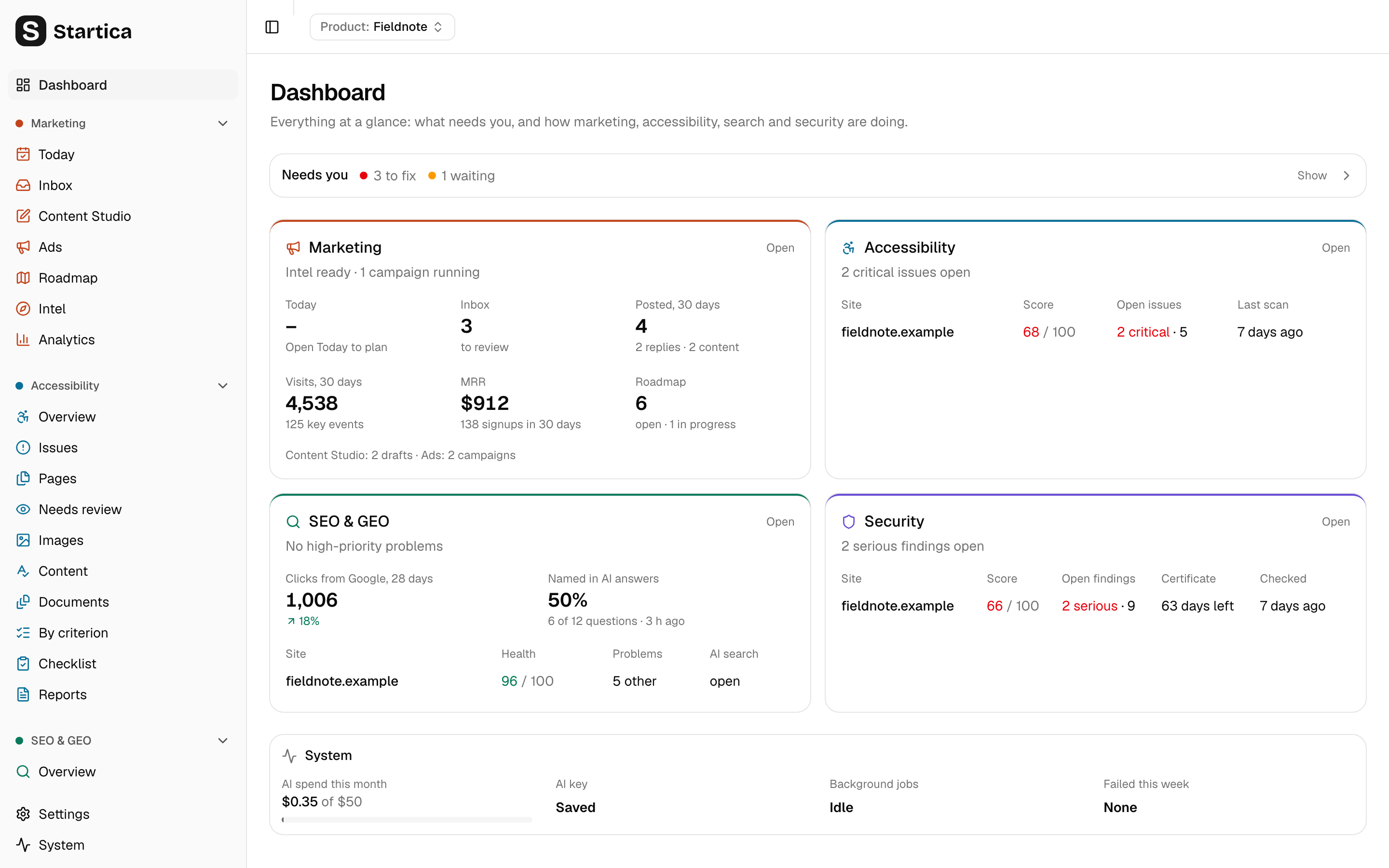
Needs you
The first card is one line that counts what needs you right now: how many things are broken or risky (to fix, red dot) and how much work is waiting (amber dot). It starts closed so the module cards are in view; click it (Show) to open the list, broken or risky things first, then work that’s waiting. Each line links to the page where you deal with it. When nothing needs you, the line says so.
| What | When it shows | Opens |
|---|---|---|
| Add an AI key | No Claude or OpenAI key is saved (not in demo mode, where AI is off). | Settings |
| AI budget reached / AI budget nearly used | This month’s AI spend has reached the budget, or 80% of it. See Costs. | Settings |
| Source isn’t connecting | An analytics, revenue or search connection’s last sync failed, with its error. | Settings → Products |
| Intel failed / Build intel | The product’s intel failed, or was never built. | Intel |
| N serious security findings on site | Open critical or high security findings on a verified site. | Security → Findings |
| Site’s certificate expires in N days | The HTTPS certificate expires within 14 days, or has expired. | Security |
| N critical accessibility issues on site | Open critical issues from the latest scan. | Accessibility → Issues |
| Scan site | A site hasn’t been checked yet. | Accessibility |
| N high-priority search problems on site | High-priority Site health problems. | SEO & GEO → Site health |
| Some AI search is blocked on site | robots.txt keeps an AI search crawler out. |
SEO & GEO |
| N background jobs failed this week | Jobs that gave up in the last 7 days, with the latest error. | System |
| An ad suggestion, for example Stop ad in campaign | The most pressing ad suggestion. | Ads → Results |
| N replies to review | Drafted replies waiting in the Inbox. | Inbox |
| N moves left today | Moves on Today not yet done or skipped. | Today |
When nothing applies, the card says “Nothing needs you right now.”
The module cards
Each module has a card in its color. Click the card’s title, Open, or any number to go to where it comes from.
Marketing: intel status and running ad campaigns, then:
- Today: moves done out of today’s list. Today’s list is built when you first open Today each day, so until then this shows “Open Today to plan”.
- Inbox: replies to review, and conversations being scored or drafted.
- Posted, 30 days: replies and Content Studio pieces you posted in the last 30 days.
- Visits, 30 days: sessions from GA4 or Umami, with the change from the 30 days before and the key events.
- MRR from Stripe, with signups from your product database, or Signups, 30 days when Stripe isn’t connected.
- Roadmap: open items, and how many are in progress.
- A line with Content Studio drafts and the number of ad campaigns.
Accessibility: one row per site with its score (green at or above the site’s target, amber within 20 points, red below), its open issues (critical ones in red), and when it was last scanned.
SEO & GEO: clicks from Google over the last 28 days with the change from the 28 days before (Search Console needed), and how often AI answers named the product in the latest AI visibility run. Then one row per site with its Site health score, its problems (high-priority ones in red) and whether AI search can read it.
Security: one row per site with its score, open findings (critical and high ones in red, as “serious”), days left on the HTTPS certificate, and when it was last checked. A site shows “verify first” until you prove it’s yours.
System
The last card shows this month’s AI spend against the budget (the bar turns amber at 80% and red at 100%), whether an AI key is saved, how many background jobs are running or waiting (the status indicator at the top right lists them), and how many jobs failed in the last 7 days.
Several products
The Dashboard shows the product picked in the product switcher at the top. Switch products there to see another one.