Guides
Today
How Startica builds your short daily list of moves, what each kind means, and how to refresh, skip or add to it.
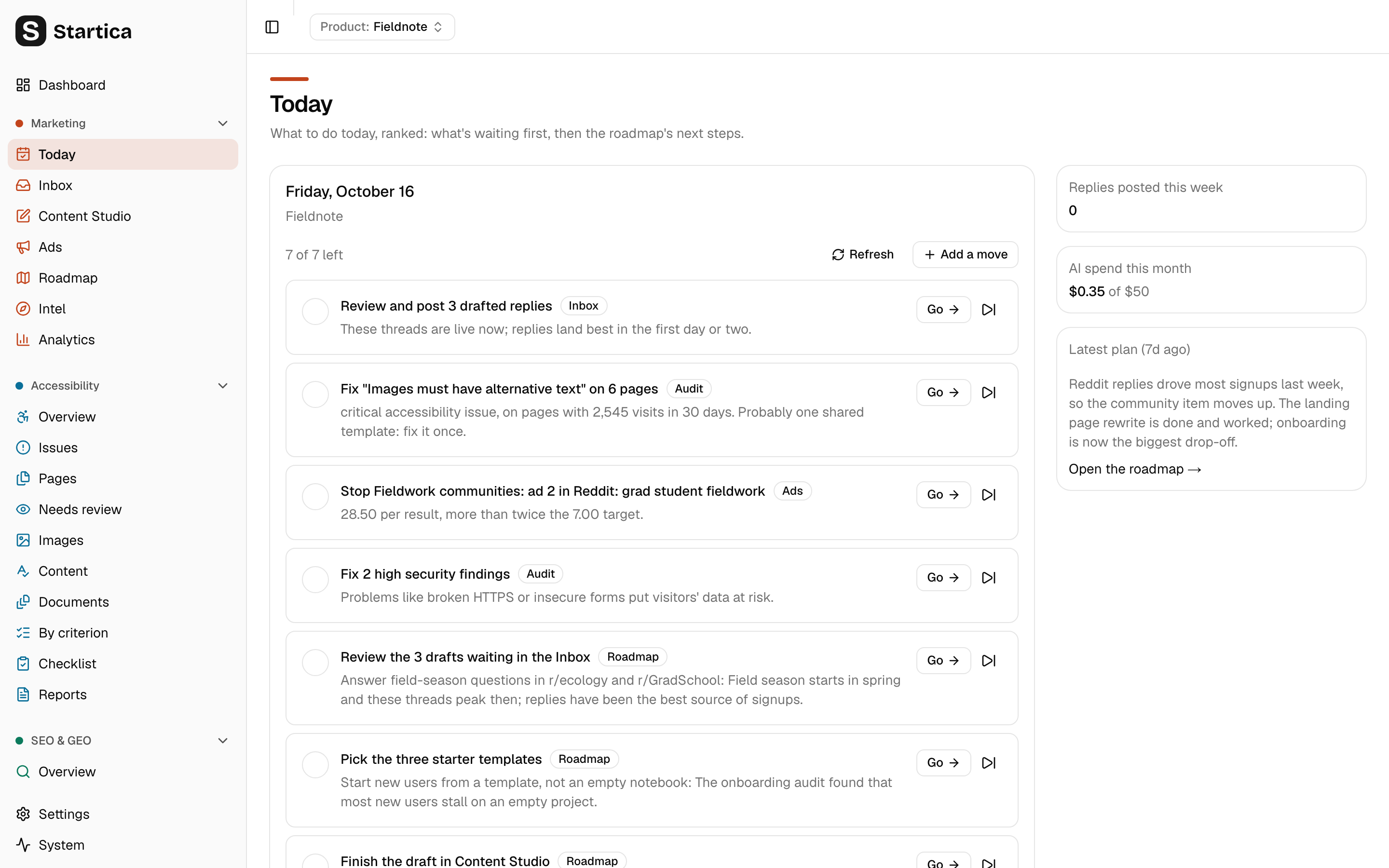
Today shows a short, ranked list of things to do today for the active product, and links straight to each one.
The list is built by fixed rules, not by AI. Building it is instant and costs nothing. The only AI involved is upstream: the weekly roadmap plan writes the roadmap steps that show up here.
What’s on the page
- Getting started: a setup checklist, until it’s done or you hide it. See below.
- The list of moves, headed with today’s date and the product name. At most 7 moves per day.
- Replies posted this week: replies you posted (with Post… or Mark as posted) in the last 7 days.
- AI spend this month, against your monthly budget. See Costs.
- Latest plan: a summary of the most recent roadmap plan and how old it is, with a link to the roadmap.
The Getting started checklist
After the welcome wizard, a Getting started checklist sits above the moves, with “N of 5 done (analytics is optional).” and a link, “Your first day with Startica”. Its six steps are Connect AI, Build intel, Pick communities to watch, Run a first scan, Connect analytics (optional) and Post your first reply, each with a button to do it. Finished steps are struck through. Your first day explains each one.
The checklist goes away by itself once the five required steps are done (everything except Connect analytics (optional)), or when you hide it with the X (Hide the checklist). Settings → General → App → Run setup again brings it back. It never shows in demo mode.
While the checklist shows, it owns the setup steps, so these moves are left out of the list:
| Move left out | Covered by the checklist step |
|---|---|
| Add your AI API key | Connect AI |
| Build intel for the product | Build intel |
| Pick 3–5 communities to watch | Pick communities to watch |
| Connect analytics (Google, Stripe or the product database) | Connect analytics (optional) |
Once the checklist is gone, these moves come back whenever they apply. So if you finished setup without analytics, the analytics move keeps showing until a connection works. The other moves (drafts, the roadmap, content and open questions) show either way.
Kinds of moves
Each move has a badge for its kind:
| Badge | Comes from |
|---|---|
| Inbox | Drafts waiting in the Inbox |
| Setup | Missing setup: API key, watched communities, analytics, a site not yet verified for security checks |
| Intel | Missing or incomplete product intel |
| Audit | The top accessibility issue, or open critical or high security findings |
| Roadmap | The roadmap’s next steps, or a prompt to create the roadmap |
| Content | A nudge to post in your saved voice |
| Ads | An ad to stop, scale or rewrite, from a campaign’s results |
| Yours | Moves you added yourself, here or with Today on an SEO & GEO opportunity |
How the list is ranked
Startica checks the rules below in order and adds a move for each one that applies. The order is the ranking.
| # | Move | Shown when |
|---|---|---|
| 1 | Review and post N drafted replies | The Inbox has drafted replies. Threads go quiet within a day or two, so these come first. |
| 2 | Retry N failed drafts | The Inbox has failed drafts. |
| 3 | Add your AI API key | No key is saved for the AI provider in use. |
| 4 | Build intel for the product | The product has no brief. |
| 5 | Pick 3–5 communities to watch | The product has a brief but no watched subreddits, Mastodon hashtags or Discourse forums. Its note says why: “Startica scans the subreddits, Mastodon hashtags and Discourse forums you mark Watch (Hacker News and Bluesky are searched by keyword).” |
| 6 | Fix “issue” on page | The top open accessibility issue on the product’s first scanned site has High or Medium priority. Its note gives the impact, the visits to the affected pages in the last 30 days, and says when one shared template is probably the cause. Go opens the issue. |
| 7 | An ad to stop, scale or rewrite | A campaign’s results suggest it. See below. |
| 8 | Fix N critical or high security findings | The product’s sites have open critical or high security findings. Go opens the findings list. |
| 9 | Verify site to turn on security checks | A scanned site isn’t verified yet. Only the first such site is listed. |
| 10 | The roadmap’s next steps | Up to 3 open roadmap items: items in progress first, then to-do items by priority. Each shows its next step if it has one. |
| 11 | Write and post one piece in your saved voice | You have a ready voice profile and created no Content Studio piece in the last 3 days. |
| 12 | Answer the open questions in the brief | The brief has open questions and you haven’t written any owner notes. |
| 13 | Generate the growth roadmap | The product has a brief but no roadmap items yet. |
| 14 | Connect analytics (Google, Stripe or the product database) | No connection is working, and no roadmap step already mentions connecting analytics. |
The Ads move (row 7) is the single most pressing ad suggestion across the product’s campaigns marked Handed off or Running, a stop first, then a scale, then a rewrite. Its Go opens the campaign’s Results tab. See What to do next.
Rows 4 and 5 are exclusive: you see one or the other, never both. While the Getting started checklist shows, rows 3, 4, 5, 9 and 14 are left out.
Only the first 7 make the list. Moves you finished or skipped still count toward the 7, but they aren’t added a second time. So when you click Refresh after finishing a few, the next moves down the ranking can move up into the open slots.
When the list is built
| When | What happens |
|---|---|
| First visit of the day | The list is built from scratch. |
| Later visits that day | The same list is shown. It isn’t rebuilt. |
| Refresh | Open moves Startica added are rebuilt. Moves you marked done or skipped, and moves you added, are kept. |
“Today” follows your computer’s local date.
Because the list isn’t rebuilt on its own during the day, counts can go stale. If the morning list says “Review and post 3 drafted replies” and a scan found two more since, click Refresh to update it.
Work through the list
| Control | What it does |
|---|---|
| Circle on the left | Marks the move done. Click again to undo. |
| Go | Opens the page where the work happens: the Inbox, Intel, Settings, Content Studio, or the roadmap item. |
| Skip button | Skips the move for today. An Undo skip button brings it back. |
| Add a move | Adds your own move with What and an optional Why. It goes to the end of the list. |
| Delete button | Deletes a move you added. Moves Startica added can only be skipped. |
Marking a move done on Today doesn’t change anything elsewhere. For example, finishing the roadmap step here doesn’t close the roadmap item. Update it on the Roadmap page too.
The header shows how many moves are left. When all are done or skipped, it says “All done for today.”
Tip
The tray menu has a Today item, so you can open the list without hunting for the window. See Running in the background.